Billboard
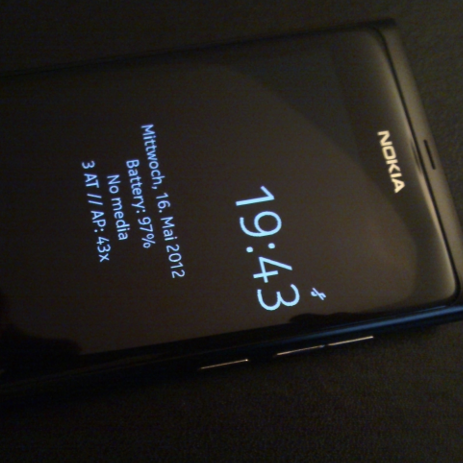
One of the great things about the Nokia N9 is the AMOLED screen with its low power mode. Unfortunately, it only shows the current time, and not the current date. Billboard is here to fix this - and add some more goodies along the way!
Community Translations
If you want to help translate Billboard into your own language, please see the following Git repository where you will find a Qt Linguist file. Translate that file, submit it to the repository, and it will be included in the next Billboard release. Thanks :)
New in version 1.0.9 (2013-05-06)
- Fixed MeeCast icon (use <<{meecast-icon-src}>>)
- New formatter that supports nested {} expressions
- LPM-optimized image dithering for better display quality
- Limit size of embedded images to avoid dithering lock-up
- Image dithering using <</path/to/image.png#>>
(# at end of path)
New in version 1.0.8 (2013-03-20)
- MeeCast icon display support ({meecast-icon})
- Wazapp online status now accessible from GUI
- USSD Balance now accessible from GUI
- Signal info ({cell-signal-bars} and {cell-signal-strength})
- Alarm present info ({alarm-present})
- Support for mixing images and text in the same line
- Center embedded images vertically (and don't scale them)
- Conflits: and Replaces: billboardlite (Demo Version)
New in version 1.0.7 (2012-12-13)
- New rendering engine
- Inline color changing ({{red}}, etc...)
- Added week number field ({week})
- Battery charge support (as graphical bar)
- Colored battery bar ({color-battery-bar}, colored when low)
- Add support for wazapp online status ({wazapp-status})
- Add support for GConf Key Monitoring and USSD Balance
- Add support for showing a battery icon ({battery-icon})
- Script output is now interpreted as UTF-8 encoded string
- Allow up to 20 lines of text (up from 7 previously)
Known limitations:
- The battery icon can only be on a separate line for now
- {wazapp-status} must be typed in manually (no item in GUI)
- {ussd-balance} must be typed in manually (no item in GUI)
New in version 1.0.6 (2012-09-20)
- Deep MeeCast integration (weather data in Billboard text)
- Added new filed: Month number only
New in version 1.0.5 (2012-08-01)
- Show IP address(es) of the device using
{ip}
New in version 1.0.4 (2012-07-23)
- Customizable text size
- Customizable font family
New in version 1.0.3 (2012-07-09)
- Fix problems for users who already upgraded to PR1.3
New in version 1.0.1 (2012-06-05)
- Override other operator logos (and restore them on quit)
- Draw other operator logo onto the billboard (optional)
- Better layout (minimum required size)
- Elide text that is too wide for the screen
- Limit other operator logo size to 120x120px
- Option to disable billboard through the UI
- New, improved settings application
- New text alignment options (left, right or center)
- More robust replacement of sysuid's .css file (reboot once)
Version 1.0.0 (2012-05-23)
- Initial release
- Display the current date on the standby screen
- Support for battery level, current song, IM presence
- Display currenly active network connections, IP addresses
- Add your custom text with the integrated editor
- For geeks: Run shell scripts and display their output
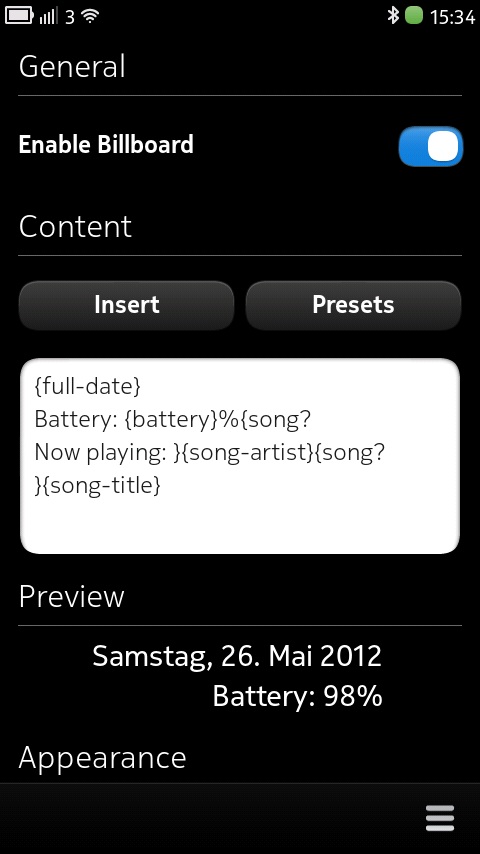
Screenshots
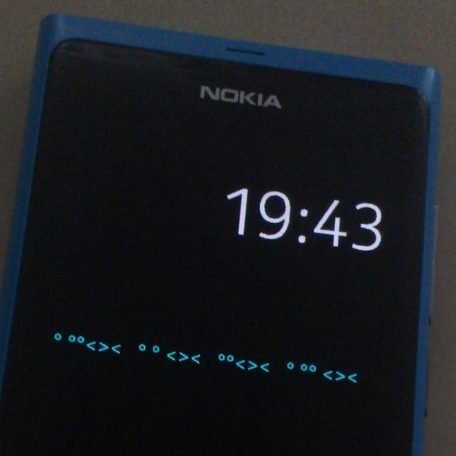
In Action
Get Billboard from Nokia Store
Current released version: 1.0.9 (2013-05-10)
Click on the Nokia Store icon to go to the Nokia Store page for Billboard. This application is only available for MeeGo 1.2 Harmattan. As this application makes use of the low-power mode standby screen of the N9's AMOLED display, this application does not do anything useful on the N950 (which does not have an AMOLED screen).
How do I...
Change the displayed text from the command line?
If you want Billboard to automatically call a script, use the
{script:/path/to/script} feature. If you want to
control the updates yourself and not have Billboard call your
script, you can do so by using gconftool:
gconftool -s -t string /apps/billboard/text 'Hello Billboard'
Troubleshooting
Remove other logo from configuration
If an old application has placed a logo on your standby screen, and you want to avoid Billboard re-using that when it is disabled, you can remove the other logo using this command:
gconftool -s -t string /apps/billboard/other_logo ''
Green text color not displaying
This is a known problem of the low power mode. To fix it:
- Open the Settings app
- Choose Device
- Choose Display
- Tap on Color profile
- Pick Vivid
Disappearing text (fixed in version 1.0.1 - please upgrade)
Do you have other appliations (e.g. other low power mode customizers or MeeCast) installed that change the operator logo? If so, please send an e-mail and report which application you are having problems with. Also, try uninstalling the other application and see if this helps. If changing the text in the configuration application does make the text re-appear, it's very likely that disappearing text is caused by some other application trying to change the text.
To find out what the system thinks the operator logo should be, try running
gconftool -g /desktop/meego/screen_lock/low_power_mode/operator_logoin a Terminal once the logo disappears - the path should give you a clue which application tries to set the operator logo.
Update 2012-06-05: The fix has now been released as update version 1.0.1 - update from Nokia Store or wait for the automatic update notification.
Update 2012-05-24: I've now tested MeeCast's low power mode feature and was able to reproduce the issue. A fix has been implemented and will be available after some more testing in the next update. See here for a preview of what the integration looks right now (this might still be improved a bit more for the final update release).
Squeezed / cropped text / too small area (fixed in 1.0.1 - please upgrade)
If the text isn't displayed properly, it could be that you either modified the sysuid CSS file yourself or that some application that you installed has changed it. The file that is important here is
/usr/share/themes/base/meegotouch/libsysuid-screenlock-nokia/style/libsysuid-screenlock-nokia.css
Make sure that the section called
LockScreen MImageWidgetStyle#LockScreenLowPowerModeOperatorLogodoes NOT have a
maximum-size set (i.e. comment it out
or remove any maximum-size definitions there).
Instructions on how to restore your original CSS file in case you changed it can be found here (including a download of the stock file): restoring libsysuid-screenlock-nokia.css
After restoring the file with the above instructions, you can then go
ahead and uninstall/reinstall Billboard (or comment out the
maximum-size line as described above) and then restart
your device in order for sysuid to load the new style.
Wrong language for date format
If the language for the date seems to be wrong for your currently-set language, be aware that the date is formatted according to the set up "regional format" set in the settings. Make sure that the regional format that you want to use is set up correctly in Settings, Time and Language, Regional Format.
Additional scripts
A collection of useful scripts that can be used with the Billboard {script:} feature can be found in billboard-scripts
Support
You can get support for this application by sending an e-mail to oviapps@thp.io (use "Billboard" in the subject line).
There is also a support thread on talk.maemo.org that you can use if you prefer that route.
The initial idea for something like this was born during experiments with the ipaddr-widget. I never got around to implement it, but found out about ejasmudar's USbS through an article on mwkn.net, and decided to write my own version from scratch. Before USbS, there was admiral0's lpsmagic. Billboard aims to "just work" and be user- and battery-friendly, while still allowing for customization.